

TTSMaker
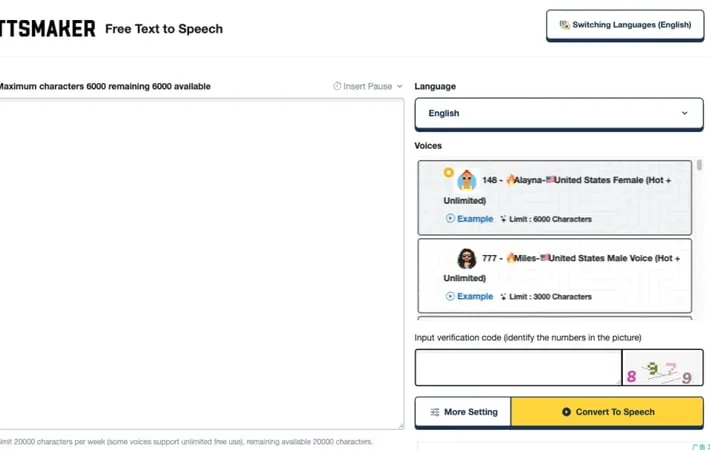
About TTSMaker
TTSMaker is an AI-powered text-to-speech platform that allows users to easily convert written text into spoken audio. It supports over 100 languages and offers more than 300 voice styles, making it versatile for a wide range of applications. The tool is free to use, even for commercial purposes, and provides users with full copyright ownership of the generated audio files. TTSMaker can be used for creating audiobooks, video dubbing, language learning, marketing content, and more.
Key Features
TTSMaker is a free online text-to-speech tool that offers AI-powered voice synthesis in over 100 languages with 200+ voice styles. It provides unlimited usage, including for commercial purposes, allowing users to convert text to natural-sounding speech and download audio files in various formats. The tool features a user-friendly interface, customizable voice settings, and a powerful neural network for fast conversion. Multi-language Support: Offers over 100 languages including English, French, German, Spanish, Arabic, Chinese, Japanese, Korean, and Vietnamese. Customizable Voice Styles: Provides 200+ AI voice styles with options to adjust speed, volume, pitch, and emotion. Commercial Use Rights: Users retain 100% copyright ownership of synthesized audio files for any legal purpose, including commercial use. Multiple Export Formats: Allows downloading audio in various formats including MP3, WAV, OGG, AAC, and OPUS. Fast Conversion: Utilizes a powerful neural network inference model for quick text-to-speech conversion.
Use Cases
Video Content Creation: Generate voiceovers for YouTube videos, TikTok content, and other social media platforms. Audiobook Production: Convert written text into narrated audiobooks for easy listening. E-learning and Education: Create audio content for online courses, language learning materials, and educational resources. Accessibility Solutions: Provide text-to-speech options for visually impaired individuals or those with reading difficulties. Marketing and Advertising: Produce voiceovers for commercials, product demonstrations, and promotional content.
Pros
Free to use with generous character limits Supports a wide range of languages and voice styles Allows commercial use of generated audio User-friendly interface with customizable settings
Cons
Some advanced features may require a paid subscription Quality of synthesized speech may vary depending on the chosen voice and language Limited to 20,000 characters per week on the free plan
How to Use
Visit the TTSMaker website: Go to https://ttsmaker.com/ using your preferred web browser. Enter your text: Type or paste the text you want to convert to speech into the text box. The free limit is 20,000 characters per week. Select language and voice: Choose the language for your text and select your preferred voice style from the multiple options available for each language. Adjust settings (optional): Click 'More Settings' to customize speech rate, volume, pitch, and other audio parameters if desired. Convert to speech: Click the 'Convert to Speech' button to start the text-to-speech conversion process. Wait for processing: Allow a few minutes for the conversion to complete. Longer texts will take more time. Listen and download: Once converted, you can listen to the audio online or click the 'Download' button to save the MP3 file to your device.
Official Website
Visit https://ttsmaker.com/ to learn more.
