

DeepL
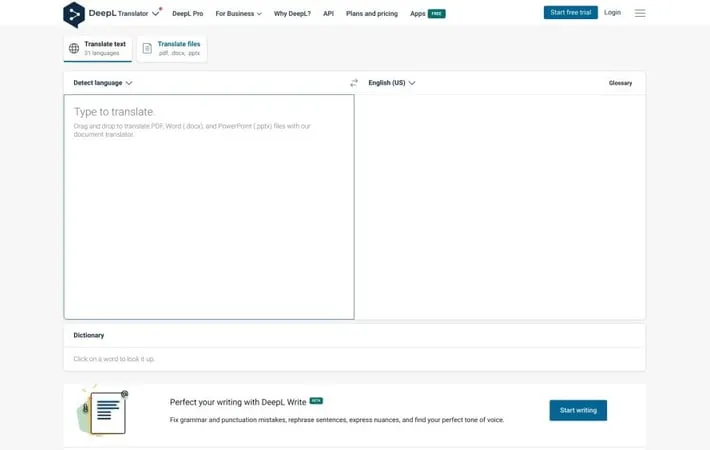
About DeepL
DeepL is a leading machine translation platform that uses artificial intelligence to provide high-quality translations. Founded in 2017, DeepL offers translation services for text, documents, and websites in 33 languages. It has gained popularity for its ability to capture nuances and produce more natural-sounding translations compared to many competitors. DeepL provides both free and paid Pro versions of its service, as well as an API for developers to integrate translation capabilities into their own applications.
Key Features
DeepL is an advanced AI-powered translation service that offers high-quality translations for text, documents, and websites across multiple languages. It features neural network technology for accurate translations, supports various file formats, provides a glossary feature for customized translations, and offers both free and premium subscription options with additional features like formality control and API access. Neural machine translation: Uses cutting-edge AI and neural networks to provide highly accurate translations that capture nuances and context. Document translation: Translates various file formats (.pdf, .docx, .pptx, .xlsx) while maintaining original formatting. Customizable glossary: Allows users to specify translations for specific terms and phrases, ensuring consistency in specialized or technical translations. Formality control: Offers the ability to adjust the tone of translations between formal and informal for supported languages. API integration: Provides API access for developers to integrate DeepL's translation capabilities into their own applications and workflows.
Use Cases
Business communication: Facilitates seamless communication between global teams by translating emails, documents, and presentations. Content localization: Helps businesses quickly translate and localize their content for international markets. Academic research: Assists researchers in translating academic papers and sources from different languages. Travel and tourism: Enables travelers to communicate effectively in foreign countries by translating text and speech on-the-go. Software localization: Allows developers to integrate DeepL's API for automatic translation of user interfaces and content in multilingual applications.
Pros
High accuracy and natural-sounding translations Support for multiple file formats and languages Customization options like glossary and formality control API availability for integration into other tools and workflows
Cons
Limited free version with character restrictions Not all features available for all language pairs Paid subscription required for advanced features and higher usage limits
How to Use
Go to the DeepL website: Visit deepl.com in your web browser to access the DeepL translator. Select languages: Choose the source language (the language you're translating from) and the target language (the language you're translating to) from the dropdown menus at the top of the page. Enter text: Type or paste the text you want to translate into the left text box. View translation: The translation will automatically appear in the right text box as you type or paste text. Adjust translation (optional): Use the dictionary feature below the translation to look up specific words or phrases for more context and alternatives. Translate documents (optional): To translate entire documents, click on the 'Translate files' tab and upload PDF, Word (.docx), PowerPoint (.pptx), or Excel (.xlsx) files. Use DeepL Write (optional): Click on the 'Write' tab to access DeepL Write, which can help improve your writing by fixing grammar and punctuation mistakes, rephrasing sentences, and adjusting tone. Download mobile app (optional): For on-the-go translations, download the DeepL app for Android or iOS devices from your device's app store. Consider DeepL Pro: For advanced features like unlimited text translation, document translation, and maximum data security, consider upgrading to DeepL Pro.
Official Website
Visit https://deepl.com/ to learn more.
